Living at OCM
Hello, Observer! OCM is your southern home for 3 weeks. Below you'll find information regarding the site, buildings, various systems working on site, important guidelines, rules, and procedure to keep you and the telescopes safe and operational throughout the whole time.
Parts of the manual - emergency and regular procedures - are printed and hang on the wall in the control room and lounge. You will find these procedures in the manual as well, in the information boxes, coded with a letter "E" (emergency) or "P" (procedure) and a number. These procedures can be easily accessed and updated in the file Control Room documents on Google Drive.
General rules concerning OCM (P1)
- This is ESO area and ESO rules apply here.
- Only observes and authorized personnel are permitted to stay or sleep at OCM.
- Use the car for necessary and reasonable travels: to pick up the observers, for the maintenance, and for supplies.
After arriving to OCM (P2)
Supervised by the observer on site.
- Read the Living at OCM section of the manual.
- Read the Observations section of the manual.
- Locate, open and check First Aid bag.
- Locate Fire extinguishing equipment in every room.
- Locate and read Emergency and safety procedures.
- Fill in the "In case of emergency" document and share its location with the other observer.
OCM introduction tour (P3)
Showed by the observer on site.
- OCAM (OCA Monitor) software and red ALARM button.
- ABC (Armazones Base Camp) and their ambulatory.
- Locate the spare key.
- Electric grounding meshes (watered).
- Electric building: fuses.
- Internet radio antenna, alarm siren.
- Water heater and boiler.
- Water tank, water valve.
- All telescopes: manual dome shutter (levers, not buttons), fuses, computers, instruments, fire extinguishers.
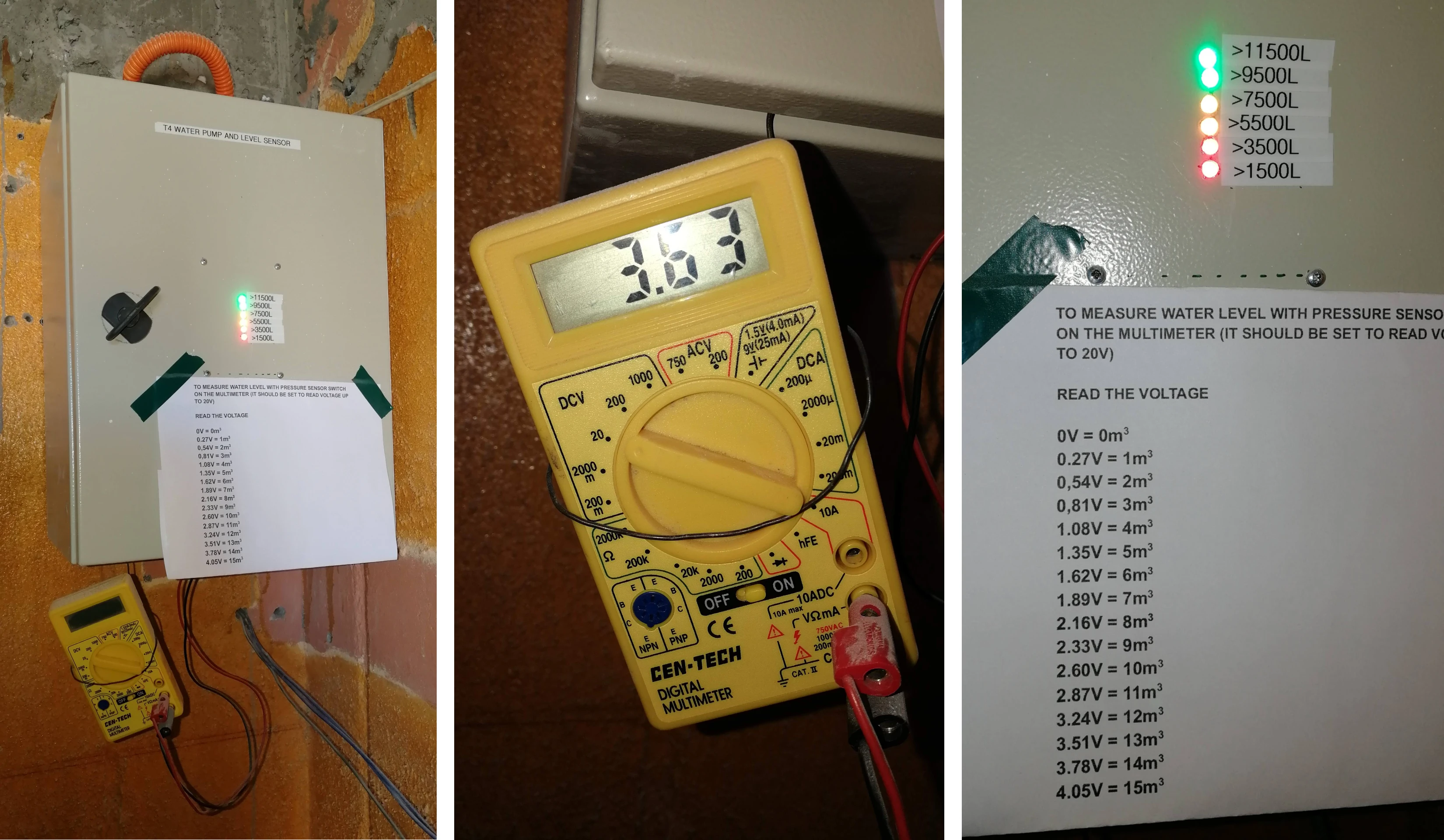
- Workshop: water level measurement.
- Server room: our computers, fuses.
- Bodega: fuses, washing machine, fire extinguisher, fire blanket.
- Lounge: fuses, guest bathroom with cleaning supplies.
The Site
There are multiple buildings on the site:
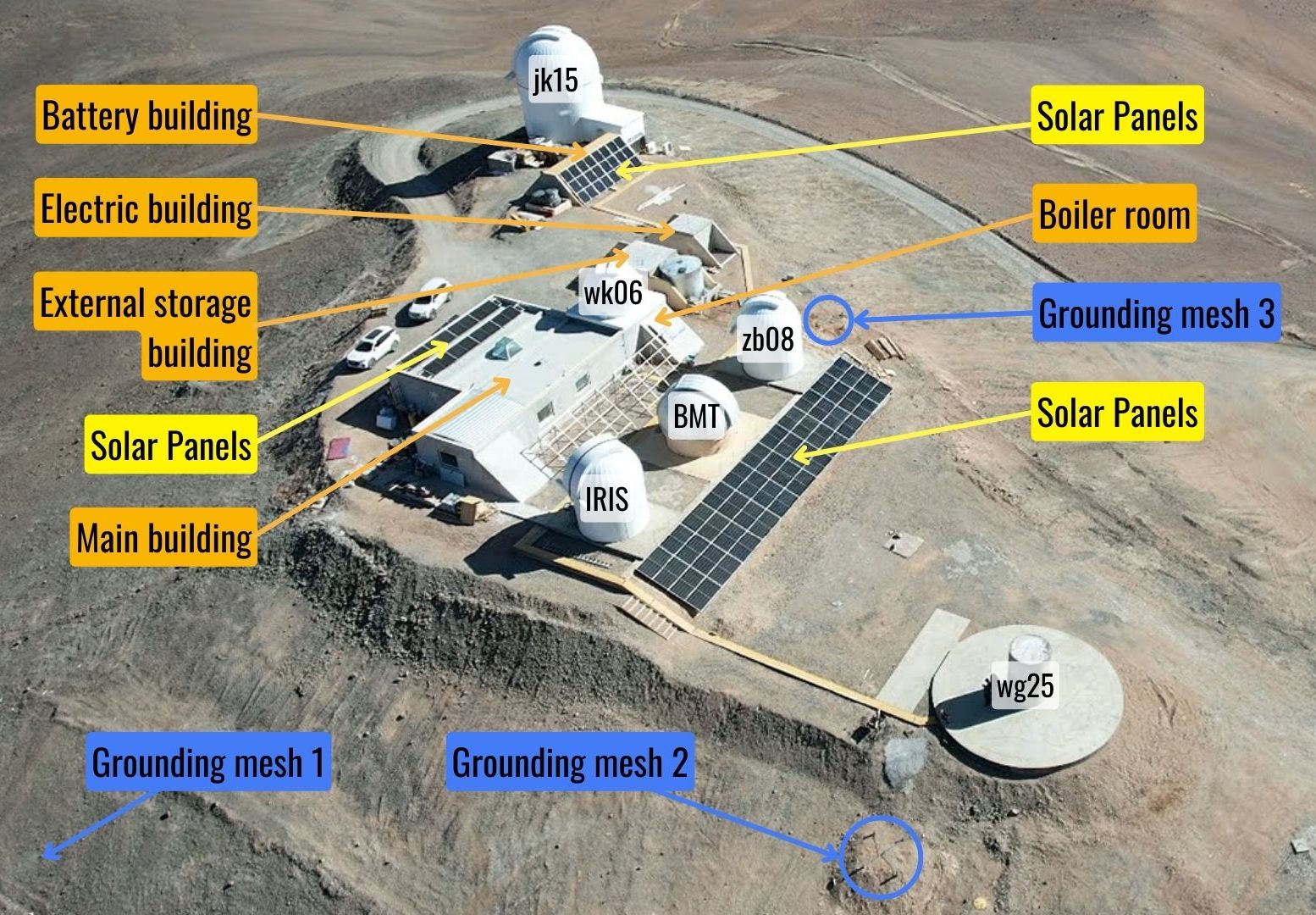
- main building (described in details below) with three bedrooms, kitchen, lounge, telescope control room and "bodega" - here we live and work most of the time. In the west part of the main building there is the WK06 telescope installed. There is also the boiler room (providing hot water) in a separate room behind the WK06 room.
- workshop (external storage building), where some heavy duty and construction tools are stored. At the back of the external storage building, there is a water tank, and in the inside there is a water level measurement computer, publishing results to NATS.
- electric building, where electric systems are installed, and main fuses are located. Outside, on the west wall there is an internet radio antenna mounted, facing ESO's Paranal Observatory. In front of the electric building there is a small generator.
- battery building, where batteries that store all the energy are located, and in a separate room to the left a diesel generator is installed. Next to the building, there is a diesel tank.
- solar panels, which are divided in three sections and installed: on the wall of the battery room, on the roof of the main building, and in front of the telescope platform.
- electric grounding meshes, two of them are close to the telescope platform, and one near the cesspool.
- four separate domes, in which the JK15, ZB08, IRIS and Potsdam telescopes are located. The WK06 telescope dome is a part of the main building, with a separate entrance. In the JK15 dome, there is a separate room with the BESO spectrograph, and in the lower flor of the dome, old telescopes and their equipment is stored.
- the concrete fundaments for the future WG25 telescope are located to the North from the telescope platform.
Fig 1. shows the general view of OCM from above. Named are all the buildings and telescopes.
Geographical location
- coordinates: 24° 35′ 55.21″ S, 70° 12′ 4.61″ W (–24.59867, –70.20128)
- elevation: 2817 m (9993 ft)
- 1km from Cerro Armazones, on the small mountain called Cerro Murphy1
- 30 km from Cerro Paranal, where ESO operates the VLT
- 140 km from Antofagasta
- 130 km from Taltal
- 180 km from Llullaillaco Volcano
-
address for delivery: Couriers fail to deliver to OCM directly. If it's a small item, ask Miguel Murphy if you can send things to him to Antofagasta and retrieve from him once you're in Antofagasta. Or he can take the delivered package with him to you when he visits OCM. If it's a big/important item, such as a telescope accessory (e.g. a camera), deliver to:
European Southern Observatory
Paranal Observatory/ Cerro Armazones
II Region
Ruta Observatorio Paranal
Chile
RUT 82.677.300-6
Ambient
Typical conditions at OCM are:
- low humidity (often < 20%)
- big temperature amplitudes 0-40°C
- strong winds reaching or exceeding 100 km/h
- more than 330 clear nights per year
Rough weather (P13)
Here are examples of rough weather at OCM and what to do if you experience it. Observing tips for rough weather are given in Observations section.
-
Strong Wind: do not go outside from the main building if not necessary. Strong wind can detach some construction elements that can cause injury, and the dust in the air can harm your eyes. Stay away from the windows.
-
Temperatures below 0°C: if the cold water pipe is exposed to temperatures below 0°C it can freeze and consequently burst the pipe. Check if there is no water leakage. Locate closing valves. Consult oca-operations on WhatsApp or Slack.
-
Rainfall: check if there is no leakage in the domes, or in the buildings. Consult oca-operations.
Main building
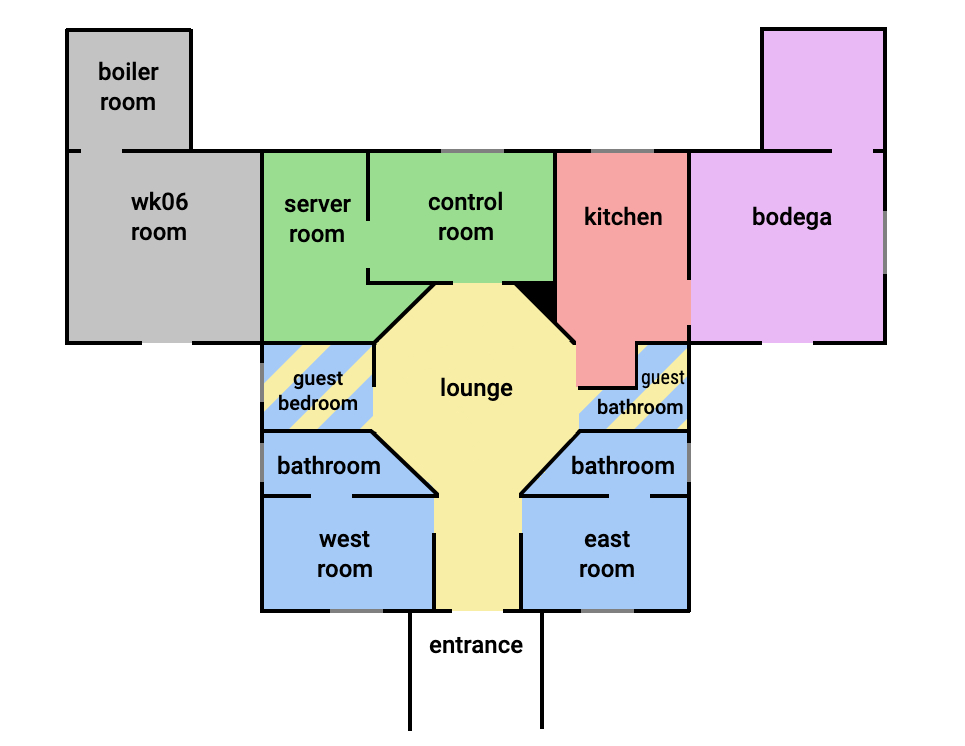
Fig 2. shows the plan of the main building. There are two main bedrooms, with beds, basic wardrobe and a desk. These bedrooms have private bathrooms with showers.
There are also additional guest bedroom and guest bathroom (without shower), where we keep basic cleaning and hygienic supplies. The living room/lounge is equipped with a recreational TV screen, a decent music system, comfy sofas, a dining table, bookshelves and a cabinet.
Kitchen is well equipped with an oven, a microwave, an induction hob, a dishwasher, and a coffee machine.
Next to the kitchen, there is a bodega (storage room), where we keep sets of duvet covers, pillowcases, bedsheets, towels, blankets, supplies and basic tools. There is also a washing machine.
Control room is the "brain" of the main building, where the telescope control stations are located, with dedicated computers, info screens, radios for VHF communication, etc. There are also dedicated cabinets to store manuals, documentation, etc.
Next to the control room, there is a server room, where main servers, routers and many computers are located. Also, there is a dedicated storage space for IT, network, computer stuff and electronics. The server room is air-conditioned and its temperature is kept at 20°C. Do not change this temperature until further notice so as not to interfere with the installation company's monitoring.
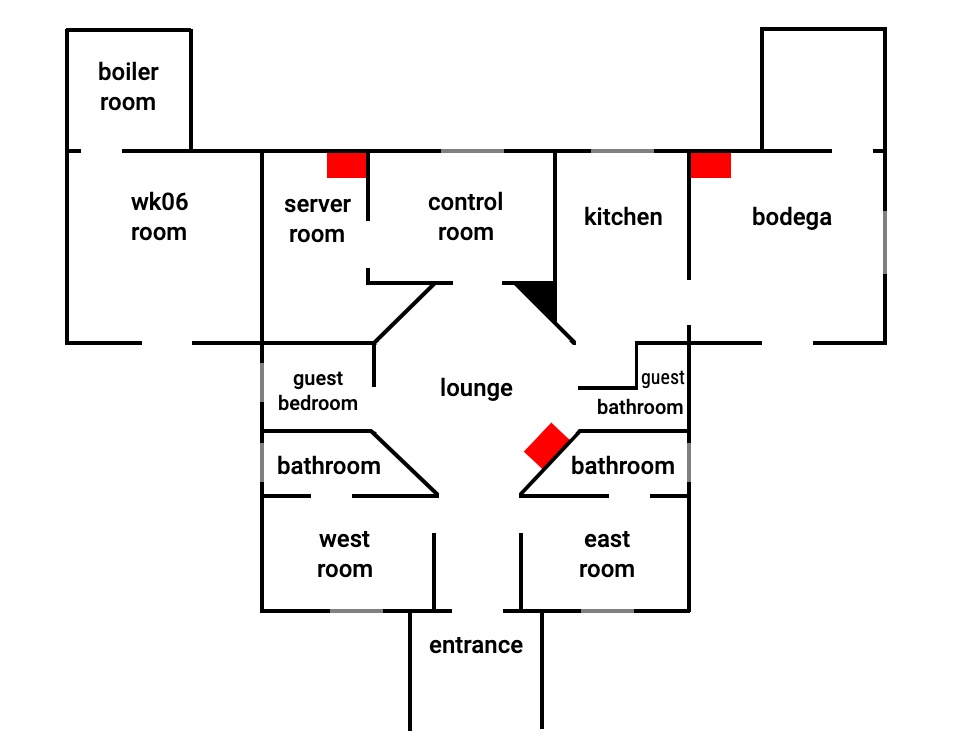
In the main building there are three fuse boxes (Fig 3.).
Multimedia system
In the lounge we have multimedia system: Yamaha RX-V4A Home Theatre and Samsung The Frame 50" TV Set.
Our Yamaha has several network capabilities, such as: Internet Radio, Spotify and AirPlay (among others). It can also play files from the devices connected to the USB port in the front panel and via Bluetooth.
There is a free Spotify account registered for: ocacontrolroom@gmail.com (it has some limitations and plays some commercials.) It can be played on OCA-phone and transmited to Yamaha by selecting it in the "Play on device".
The main key and other keys
The key to the main building should be always in the possession of an observer or in the main door (for safety reasons it is discouraged to keep the key in the door from the outside). Be aware that the door locks after closing, so you need the key to enter from the outside - otherwise you will be stuck outside. In such a case, use the spare key located near JK15.
Every dome has its individual key, which is located in the key box in the control room, and labeled accordingly (e.g. "DOME ZB08"). The only two exceptions are WK06 room/dome and the Potsdam dome, because to open these domes you use the very same key that opens the main door. You might need to use some strength or wiggle the key in order to open the WK06 door. At all times all the buildings and telescope domes should be closed and locked if possible. The exception is the main building, because there is always someone there.
Make sure that all the telescope doors are locked at all times. Open them only when you enter to the telescope, and close and lock thm with they key when you exit.
OCM computers and network
Internet is provided via Paranal with radio antenna. The router is located in the server room. In OCM there are more than 15 computers and many more (100) semi-computers and virtual machines, responsible for different tasks with allocated IP.
Additionally to the main server (perun) and its backup (pieron), we have physical machines of three types: Zotac Zbox, Lenovo and Raspberry Pi. It ensures interchangeability in case of failure of one machine.
Two computers in the control room are telescope operation stations: zenith and nadir, where all the observations are taking place. Two additional computers: zora and aux, are auxiliary and are used, e.g. to display the weather (more about them in Observations section.)
There are also two spare Zotac computers stored in case of failure - one is the copy of the router. Other computers (nawia-kvm, majka-kvm) host virtual machines, and one is a dedicated router.
Telescope Control Units (TCU) and instrument control units are called consistently: zb08-tcu, jk15-tcu and jk15-ccd, wk06-tcu and wk06-ccd. There's no zb08-ccd, because zb08-tcu controls both the telescopes and its camera.
You can access remotely some of those machines with ssh using their DNS provided names: e.g.
ssh observer@aux.oca.lan
The server disc space (NFS) is available (but not visible) for some machines: /data/fits or /data/misc
Controlling storage space
Storage space on physical and virtual machines can run out, so it's necessary to check disk space on Graphana Dashboard. Since May 2024 there is a script running on all TCU's, removing old logs, but still it can be necessary to clean disk space if above 85%.
Cleaning disk space on TCU's manually (P14)
Running out of disk space will result in a problem with the start of RemoteServer and ASCOM drivers, which is described in the Troubleshooting section. Disc space should be cleaned as follows:
-
Remove the oldest ASCOM logs from the Windows system. Connect via rdesktop on aux computer and locate logs (they are heavy, about 3GB each) in a folder ASCOM, which is listed on the left-hand side of the File Explorer as starred. Alternatively, you can find them from its absolute path:
Leave files 2 weeks back, remove the rest of them.c:\Users\asaroot\Documents\ASCOM -
Remove the oldest ASCOM logs from the Windows system. Connect via rdesktop on aux computer and locate logs (they are heavy, about 3GB each) in a folder ASCOM.Alpaca, which is listed on the left-hand side of the File Explorer as starred. Alternatively, you can find them from its absolute path:
Leave 4 days back, remove the rest of them.c:\ProgramData\ASA\ACC\ASCOM.Alpaca
Internet failure
Currently (May 2024), a break of the internet connection from Paranal will result in failure of the local oca.lan network .7
Internet failure (P30)
- Open a browser in the computer that is only connected to wifi "oca operators" (and not ethernet cable), and type the address:
192.168.20.1. If a website UniFi OS loads, that is a sign that we have internal wifi, but the problem is on the outside. - Log in as observer with a standard observer password and a capital letter R in the end instead of regular r.
- Click on Network icon. You should now see on the left-hand side of the screen when the internet was lost and due to what reason (Entel Chile). If this is the case, you either have a problem with Entel (so you just have to wait for the provider to resume his services), or with Paranal (who changed something on their site that didn't affect them, but cut us off from the internet).
-
Contact pwielgorski, he will know who to talk to at Paranal. In order to do that, you have to have internet, though. There are two solutions:
- If you have your own phone with Chilean SIM card and a package of GB (or if the OCA-phone has a package of GB valid), find a spot in the observatory where you have reception. It might be close to the electric room (Movistar) or in the IRIS dome (Entel).
- Go to the ABC and ask for an internet connection. If you have been recently to Paranal, you might still have their login and password saved as a photo or a note (or you might remember it). Then just drive to the ABC, park close to the main buildings, and connect to their wifi (dirty but works...)
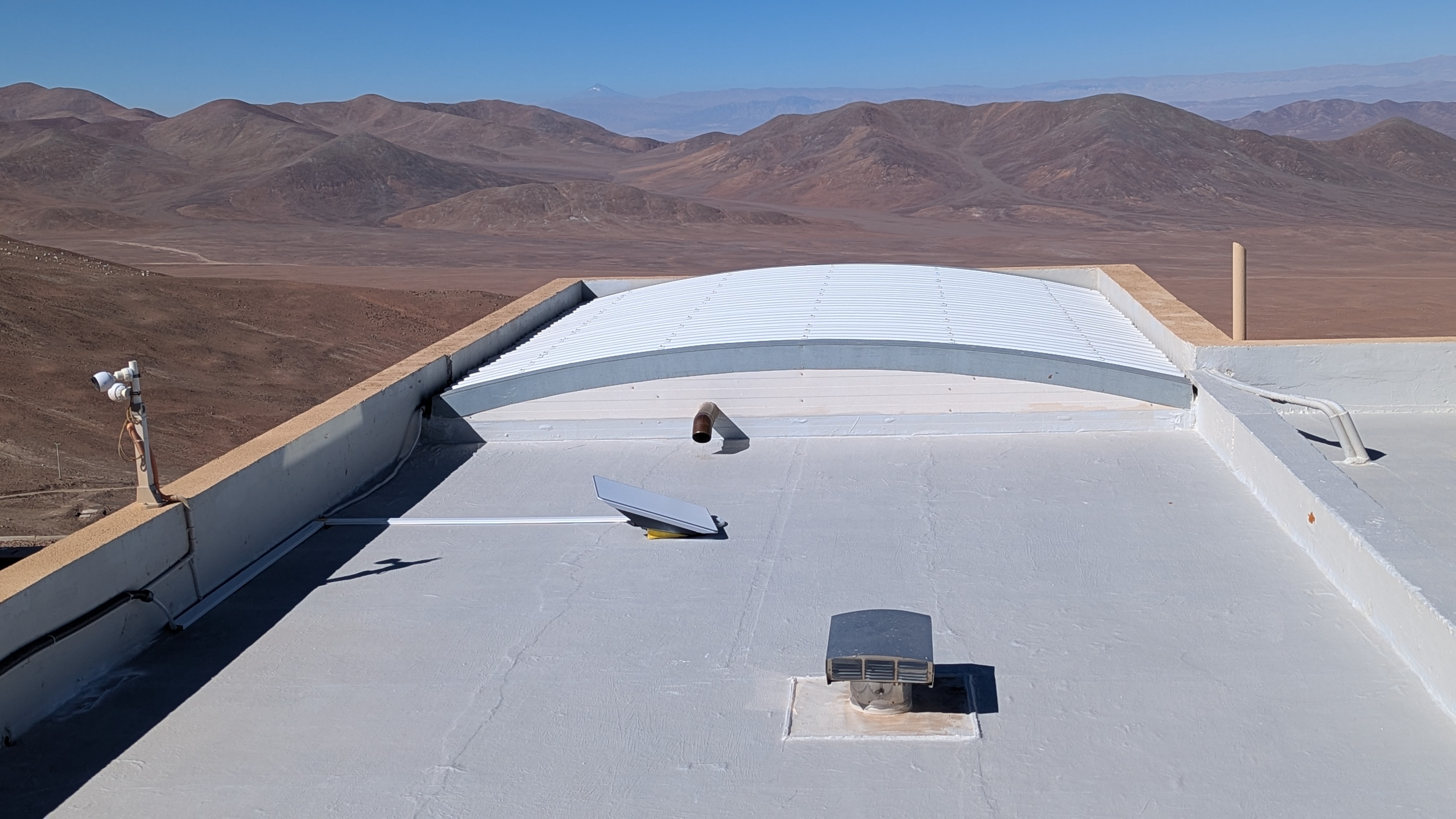
We have a backup internet connection via a Starlink antenna. It is located on the roof above the kitchen (held with weights but not screwed) - you can see it from the WK06 dome (Fig 4.). The download/upload are 400/40 Mbps. Starlink seamlessly provides backup internet if other devices fail, and widen the bandpass for more data transfer on daily basis. You can connect to wifi "OCA-Elon" with the password visible on the router in the lounge under the TV.
Energy
Energy is produced on site with solar farm, and stored in the accumulators in the battery building. Power is distributed via ducts to each building, with separate cables. In the electric building there is the main fuse box.
The solar farm and batteries can be monitored on sunny portal online after logging in as ocacontrolroom@gmail.com and with the standard observer password followed by "A!". You can also see the batteries from OCA-phone, through the app SMA 360 or SMA Energy.
As you can see from the graphs on the sunny portal, the standard power consumption at OCM is about 3–4 kW. During the morning the batteries charge fully and for the rest of the day the energy needed for daily OCM operations is taken directly from the solar panels. At night, the energy is taken from the batteries, and they state of charge goes down from 100% to about 85–90%, before they are recharged the next day.
Power failure (P31)
Most common power failures are due to:
- The short circuit. Some equipment may create a simple short circuit by malfunctioning, causing a fuse to trip or blow. Check all fuses in the fuse boxes in the affected areas. The fix may be as easy as unplugging the malfunctioning equipment and switching on the tripped fuse again (or replacing the blown fuse respectively).
- The abnormal behaviour of the Sunny Island, i.e. the complex of solar panels and batteries. You will know immediately that you lost power, because the UPSes in the server room will start beeping loudly and frequently. Go to https://ennexos.sunnyportal.com (login as observer, password is the standard observer password, followed by "A!"), and check on the dashboard, in the status tile, if the two main clusters have grey icons which indicates impaired communication (Fig. 4). If you can't reach the website using computers in the control room, try your own laptop or smartphone, because they connect via WiFi and not Ethernet.
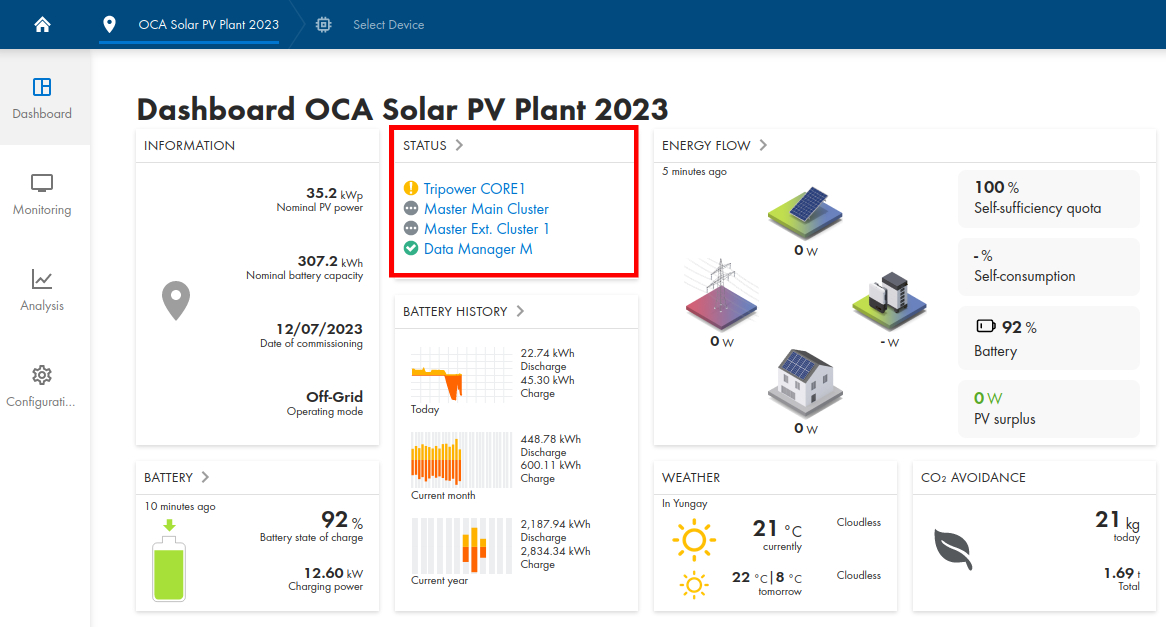
If this is the case, follow the instructions in a document "Procedure in case of system failure": the printed version is on the shelf in the control room, and the digital one is stored on aux computer in the Documents directory and on OCA-phone in the Documents as well. This procedure is also described in detail in Electric System: Problems with the solar power plant.
If nothing has worked so far, contact oca-operations on WhatsApp or Slack from OCA-phone (you should have reception in the IRIS dome) or from the ABC. At this point it has been about 20 min without power and consider it might be longer. If the power failure happened during observations, use these 20 minutes to secure the telescopes, close the mirror covers and dome shutters.
If you cannot contact oca-operations, try contacting ABC through the black radio; ask them if they have power. If this fails, go down to ABC and check with them presentially.
Once the power is restored, restart all affected equipment. Check and restart, if necessary:
- all UPS'es
- all computers in the server room and the control room
- all computers controlling the telescopes and instruments, including the cooling of the cameras (see telescope manuals)
- if the telescope have been closed, but you still have time to observe, resume the observations.
Report the event in OCM ticket system and add a tag "documentation" so that your experience will be added to this manual.
Generators
There are 2 generators at OCM: the big generator, and the small generator.
The big generator is supposed to turn on automatically, when the battery level drops below 15% (needs update). However, it is possible to turn it manually (check the details in section Electric system section). Do not run the generator for longer than 6 hours. If you need to run it longer, give it a 1-hour break first.
Maintenance of the big generator
The big generator is maintained yearly by Miguel Murphy. The big generator is also tested by Miguel Murphy every month to check that it is still working. Ask Miguel when was the last time he checked it, to remind him about this task.
The small generator is the ultimate back-up in case the big generator doesn't work. It is supposed to supply energy only to a handful of computers, to allow the internet connection in order to call for help. It is described in detail in section Electric system section.
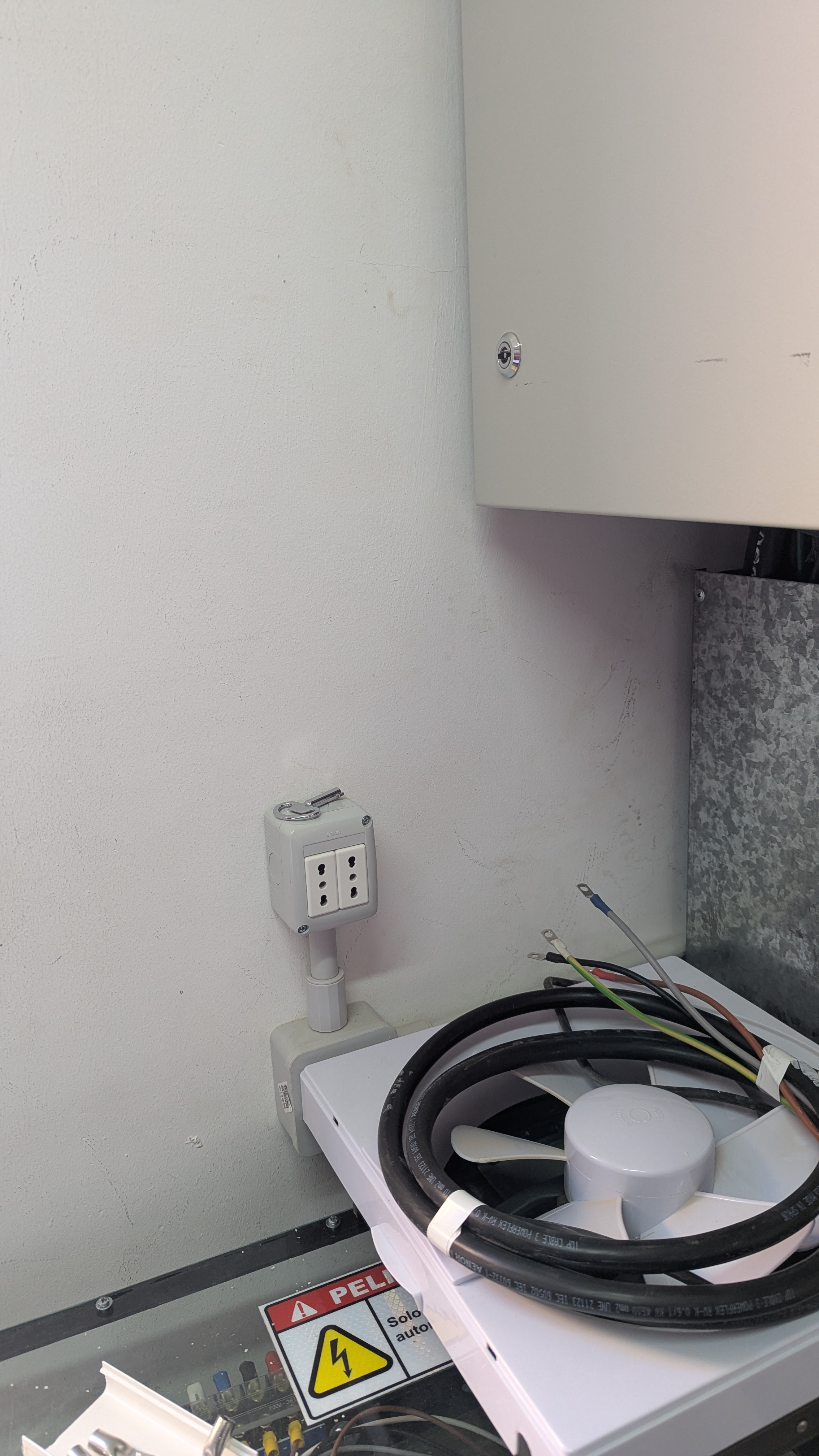
In the electric building, there's a socket to the left wall from the entrance, at the hight about 1m from the ground (Fig 5). It is connected to the small generator. It may be used to draw power directly from the generator.
Diesel tank
Diesel tank can contain up to 2-2,500 liters and is connected to the main generator to secure its work in case of emergency. Two additional 20-liter emergency canisters with diesel (40 l in total) are stored in the external storage building. If the observers use this fuel, they should refill the canisters as soon as possible and not leave them empty.
Now that the new OCM car, Toyota RAV4, runs on gasoline, the diesel in the diesel tank is used only to power to generator.
Water
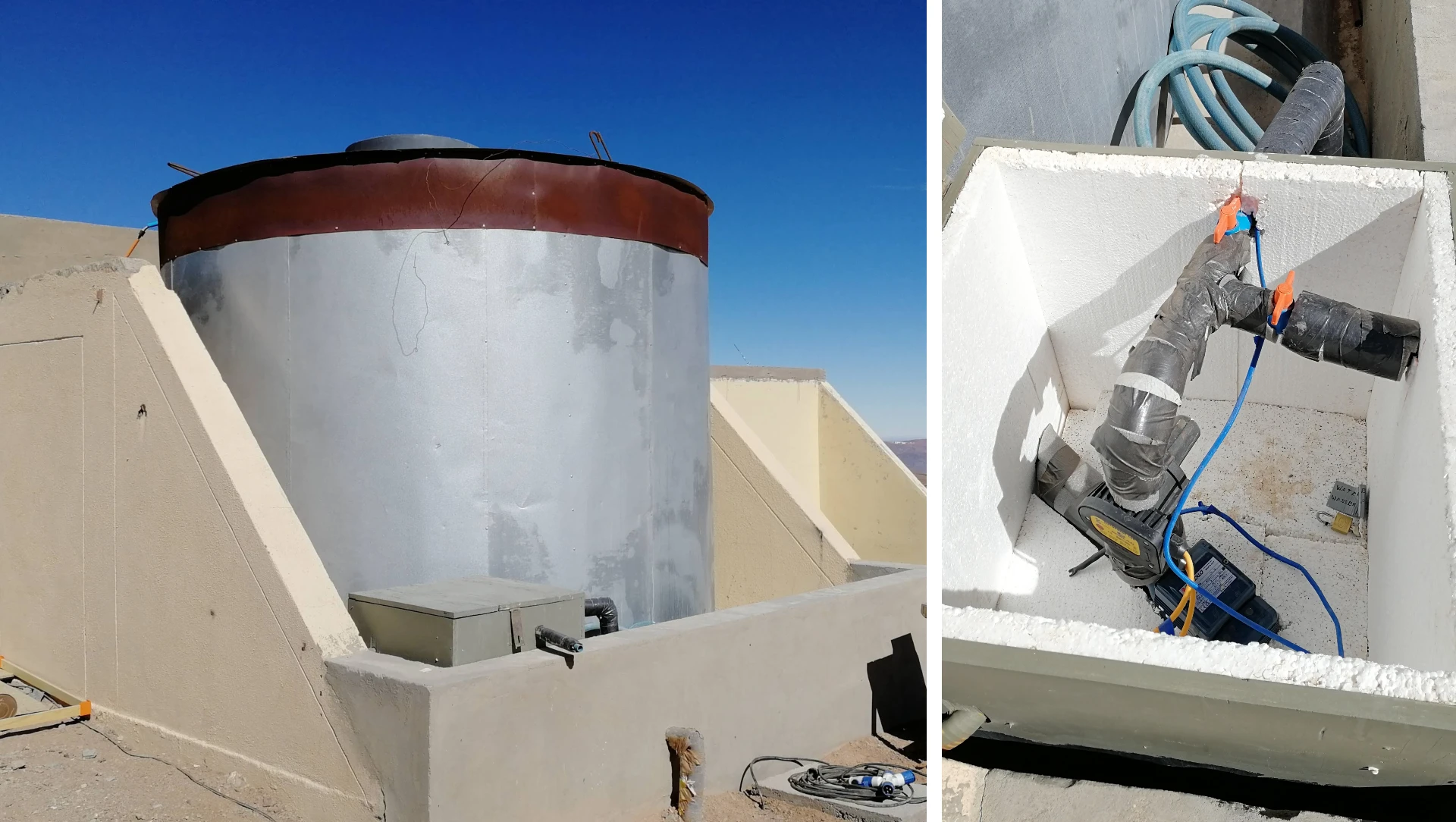
The cold water tank with the capacity of about 15m3 is located behind the External storage building (Fig. 6).
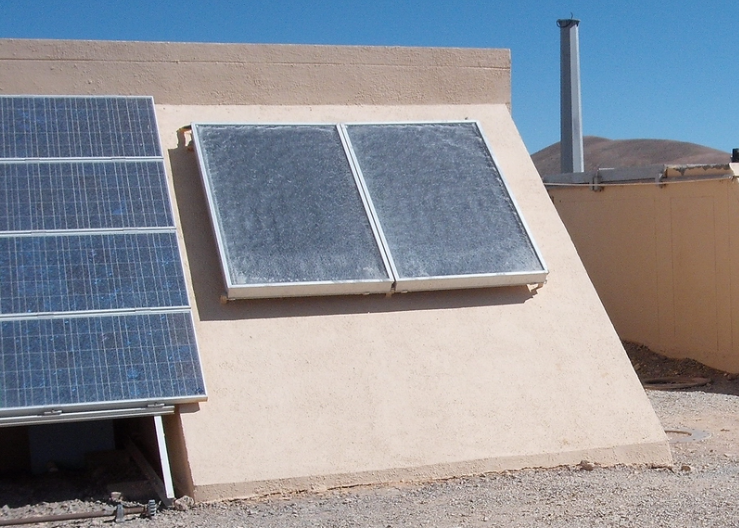
Hot water is produced with a flat-plate solar-thermal collector (Fig. 7) and it is stored in a boiler in the back of the WK06 telescope room. To open/close water swivel valves turn counter-clockwise/clockwise. For more information about water heater, see Water Heater section below.
Water level in the tank
Regular usage is about 150l of water per day. Check the OCM calendar for the most recent measurements and add your measurements every few days. The water level is being measured automatically, and displayed in control room OCAM. One can also check it manually in the external storage building.
??? tip Background: Water measurement system
There are two systems measuring water level (<a href="#water-reader">Fig. 7</a>):

    - low resolution reading is made of LEDs and shows 6 levels of water
    - high resolution reading requires you to turn ON the multimeter and read the value on the screen.

After the reading, turn the multimeter OFF.

To precisely calculate volume of remaining water $Q$ using high resolution reading, one can use the Remaining Water Equation:

$$ \text{Q} = \frac{1}{\omega}U $$

where

$$\omega = 2.7\times 10^{-1} \;\;\text{V}\,\text{m}^{-3}$$

is the Wielgórski constant, and $U$ is the voltage read from the multimeter.
Ordering water
When the water volume is ~10% of the max capacity (about 1-2m3) write to "rumyboris.flores@eso.org" with a copy to "parlogs@eso.org", and ask them to bring new water to OCM (copy-paste previous emails on gmail). Do it 2-3 days in advance, because it usually takes them 2-3 days to organize the delivery. The water will be delivered by an external non-ESO company, but ESO participates in the ordering process. If you receive a bill for water delivery, put it in the documents drawer in the control room, in the cabinet under the desk to the right.
Refilling water
Be prepared to climb on the top of the tank, open an inflow hole, and put the hose into the hole. Usually the driver who brought the water helps, but you can never be sure. The volume of delivered water is usually somewhat larger (18m3) than the volume of the water tank (15m3).
Never leave the hose unattended when refilling the water! The water running under strong pressure inside the hose stiffens it, so that the hose might straighten up and "jump" out of the hole, releasing the water all around the water tank.
In case you have excess water, release it inside the cement box holding the water container. This will create a small pool, but it is better than releasing the water outside and risking flooding the ducts with cables.
After the filling is complete, dismantle the hose, close the hole and enjoy a tank full of water again :)
(To do: photo with the top of the water tank to show how to refill it.)
Water heater
Warning
The working fluid is (probably) toxic, so handle it and refill the system with caution.
The process of heating water is done with the flat-plate solar-thermal collector located on the north side of the main building (Fig. 7). A boiler and heating devices are located in the WK06 building, on the ground floor, in a small storage room in the back.
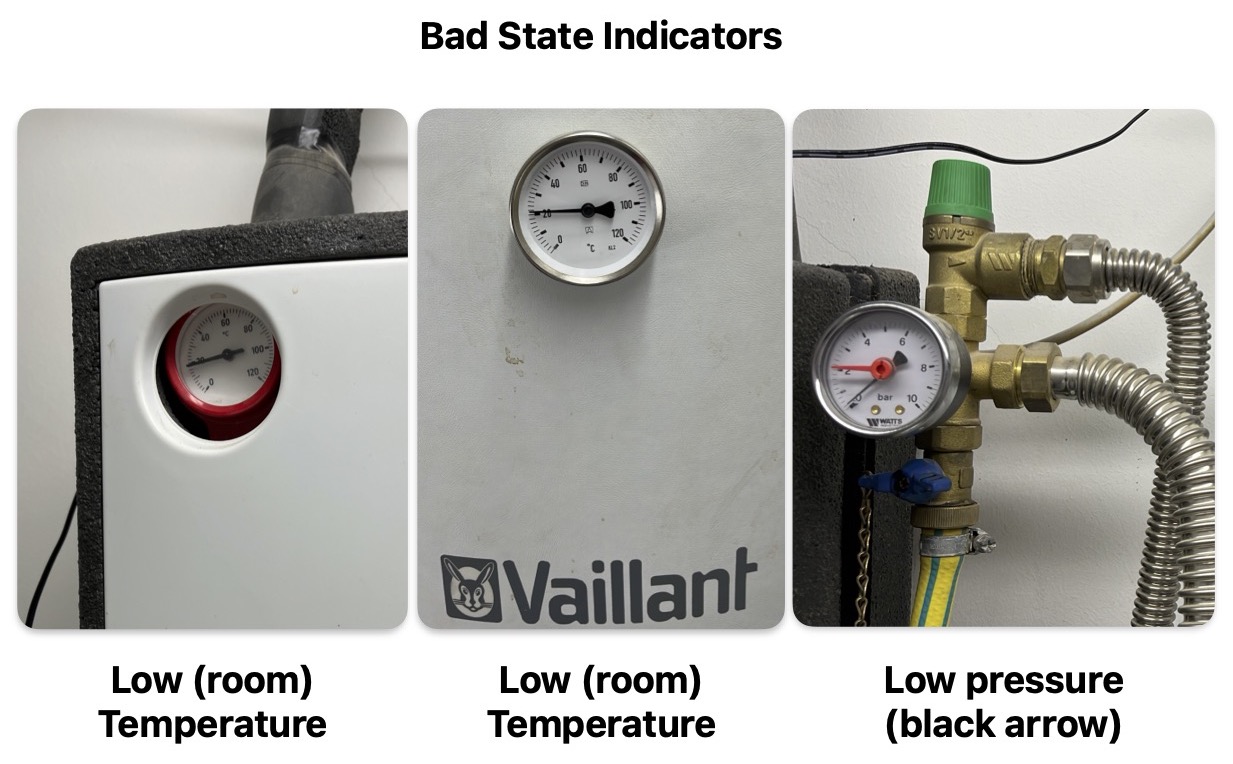
The solar collector utilizes a working fluid composed of a mixture of water and glycol. Due to minor leaks, this fluid requires regular replenishment (every 1-2 weeks). A depletion of the working fluid results in the solar collector's inability to heat water, thereby cutting off the hot water supply. Fig. 9 illustrates the symptoms indicating the system running low on working fluid:
- low temperature in the boiler
- low pressure on the manometer indicated by the black arrow (not red!).
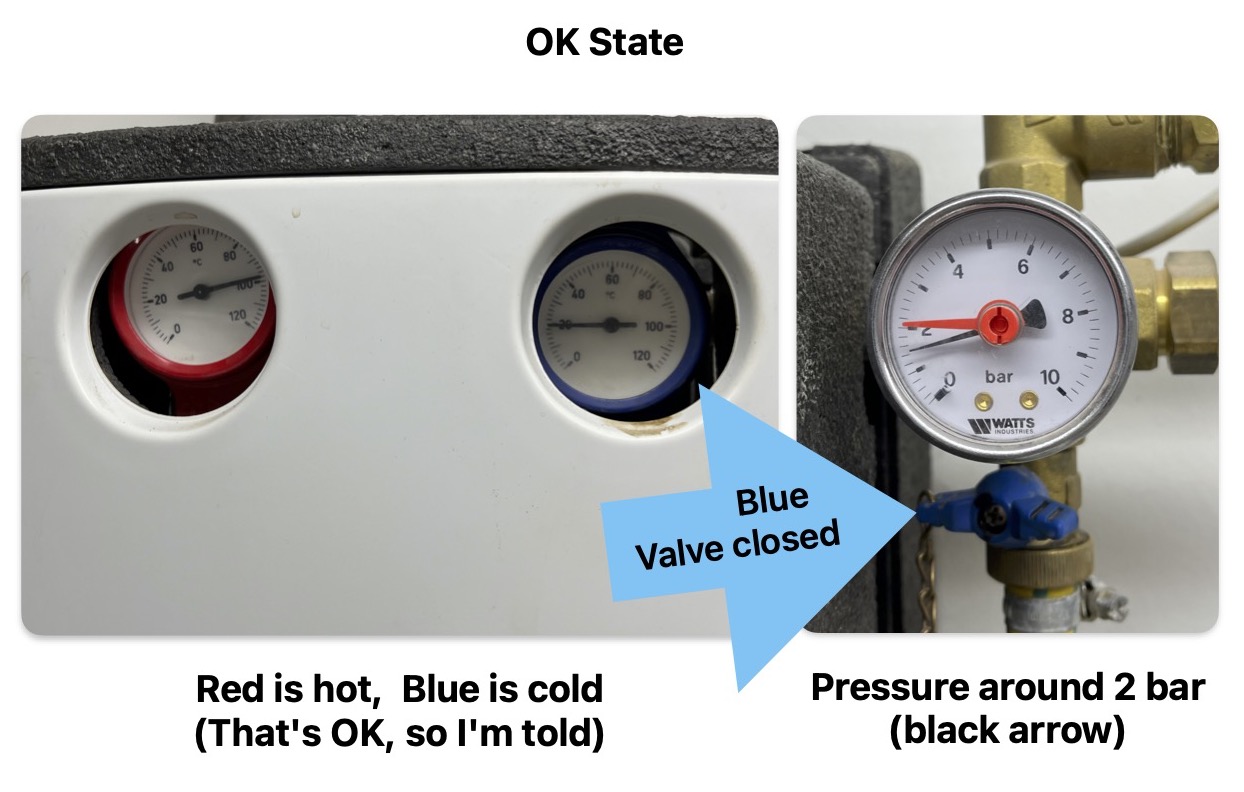
Ideally, the black arrow on the manometer should indicate pressure at around 2 bars. If the pressure falls below 1 bar, the system needs a refill. The procedure P15 describes how to refill the working liquid back to the circuit.
Warning
Be cautious of the liquid returning to the barrel through the pressure valve via a metal pipe, as it may be hot.
Refiling working liquid in the water-heating system (P15)
- Go to the WK06 building, to a small storage room on the ground floor, in the back.
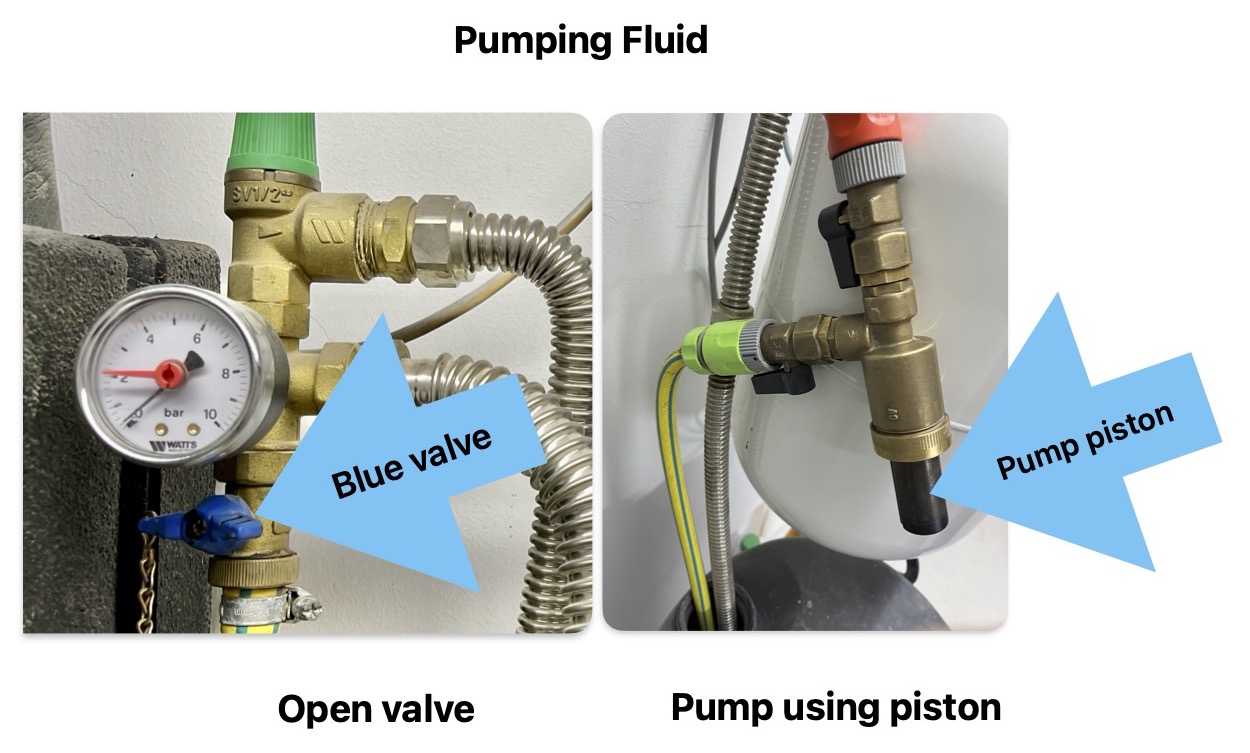
- Open the blue valve located on the pipe (Fig. 9, left). In order to open it, turn it 90 degrees so that its position is parallel to the pipe.
- Make sure that the yellow hose, which draws the fluid from the barrel, is fully submerged. Elevating the barrel might be necessary to achieve proper submersion.
- Use a pump piston (Fig. 9, right) to transfer the working fluid from the barrel. Push strongly the pump a few times (from 2 to 10-12), until the pressure rises to around 2 bars.
- Close the blue valve (turn it 90 degrees so that its location is perpendicular to the pipe).
- The system might take time (minutes-hours) to go back to the OK state (Fig. 10).
- In instances where the system had been empty and the solar panels have been hot for a longer time, you might need to repeat the procedure in coming hours or days, so check the levels frequently (hourly, daily, until you see the pressure stays stable at around 2 bars).
Mixing new working liquid
Sometimes the glycol-water mixture in the barrel needs to be refilled. Check the level of the mixture in the barrel every few times when you do the pumping, and once it is low in the barrel (so that soon you won't be able to pump it), notify oca-operations that you are about to refill it. In order to refill it, pour glycol and demineralized water (the same as used to clean the telescope mirrors) into the barrel in 1:4 ratio (e.g. mix 200 ml of glycol with 800 ml of water, creating 1 liter of glycol-water mixture). You can add glycol and water separately into the barrel and mix them in the barrel my moving/shaking the barrel.
Glycol is located inside the same small storage room with the boiler and the barrel, should stay on the floor inside a small semi-transparent white canister of 5 liters. The demineralized water is located in bodega on the rack to the left of the window. If you cannot find either – contact oca-operations.
If you run out of glycol or demineralized water – contact Miguel Murphy.
Hot water circulation pump
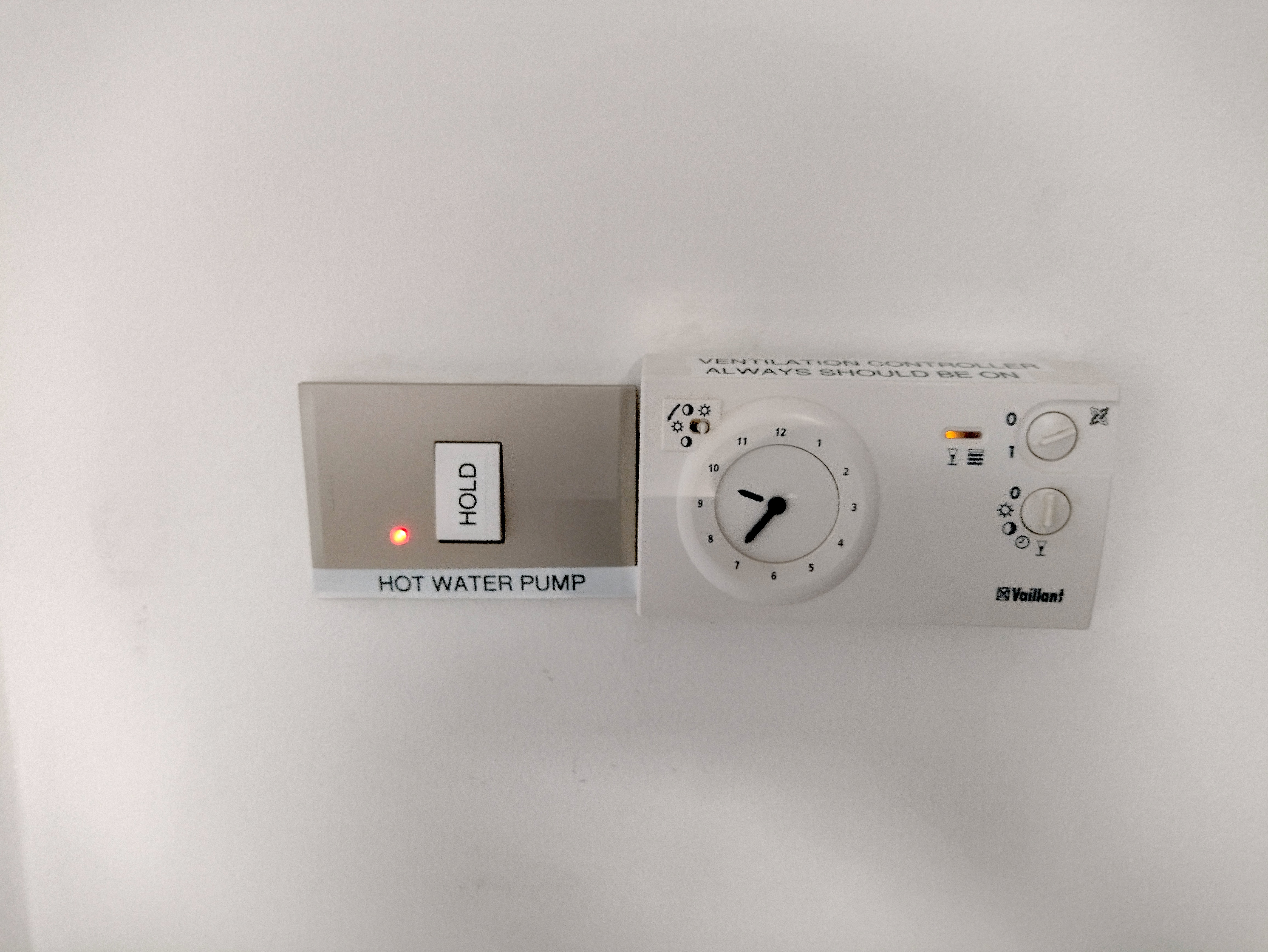
Water is valuable resource in the desert, so we try to save it as much as possible. At the same time, we enjoy hot shower. Instead of waiting for hot water to flow to your shower and waste perfectly good cold water, now you can enjoy almost instant hot water. How? Press for 1-2 seconds a switch for a hot water circulation pump in the lounge (Fig. 10), which will light the diode and turn on the hot water circulation pump. After about 2 min the diode will turn off meaning that the pump did its job and now the hot water is already flowing through all the water pipes at observatory, so you don't have to wait for hot water anymore.
Air circulation system, ventilation system
Ventilation system is used to circulate air in the building. The old air from the bathrooms, bedrooms, the control room etc. is replaced with new air from outside. Therefore the ventilation must at all times be ON. The ventilation control panel is located in the lounge (Fig. 10). Here are its settings:
- 0/1 – circulation OFF/ON (keep it ON)
- 0/sun/moon/clock/glass - strength of the air stream through the rooms, from zero to the strongest
CCTV System
The observatory site is under surveillance by 9 cameras of the CCTV system, covering most important locations on site and inside the telescopes' domes. The view from the CCTV is displayed in the control room, but also is available to remote telescope operator at CAMK, and Grzegorz Pietrzyński, Miguel Murphy, Mikołaj Kałuszyński, Piotr Wielgórski, and Marek Górski.
To access the CCTV view, access OCM home page in a browser, and in the left-hand vertical menu click a link CCTV Cameras, or click here (password-protected).
Automatic upgrades of cameras' firmware can cause cameras to go offline from time to time for about half an hour. If the disconnection lasts longer, try to unplug and plug back the camera that is offline. If it doesn't bring the camera back online, contact oca-operations. This issue is described in Troubleshooting.
Supplies, spare parts, tools, and storage
In OCM there is a lot of useful supplies, spare parts, and tools. You can find them:
-
in the bodega (storage room):
- on the rack 1 you will find spare batteries, power adapters, extension cords, etc
- on the racks 2 and 3 there are clean sets of bedsheets, towels, blankets, etc
- on the rack 4 and 5 you will find basic tools and some cleaning and housekeeping stuff
-
in the guest bathroom: cleaning supplies
- in the server room: computers, IT and electronics tools and spare parts
- in the external storage building: construction and heavy tools
If you use any of the tools or devices, please put it back to its place! Also, do this if you find any item left by other observers.
Location of most of those things is listed in the Inventory document.
Important or useful small devices
Flashlights
The flashlights are located in the control room. Check if all are operational, if not, replace batteries and check again.
OCA-phone
The phone is Samsung Galaxy A70, the phone number is +56 9 4295 4800, and the SIM card is from Entel provider. The charger socket is an USB-C. There is a lot of useful contacts, reachable via WhatsApp or Slack (oca-operations), and some important apps:
- Gmail, Slack, WhatsApp
- SMA Energy to monitor batteries
- OCAM mini to check telemetry
- OCM Manual
- DJI Fly to control our drone
- wBox to monitor temperature in the main building and the domes, and control LED lights and blinds
- Zoom and Teams
- Maps by Google
- Unifi
- RVCN Viewer
- Stellarium
- MusicCast that allows you to connect to our Yamaha Home Theatre
- Entel app to check your balance and recharge it
- many important Contacts
How to check and recharge your balance
You have the Entel app installed in the phone, where you can check your balance and recharge (recargar) if needed. You can buy a "bag of internet for a day" (comprar bolsas → bolsas llimitadas (or Datos + Minutos) → por 1 dia $890); this is especially useful if you go Antofagasta and you want to make sure you stay connected.
Alternative way to check your balance: dial *103# (you need to have mobile network).
We don't have a dedicated person to monitor or recharge the balance on the phone. It is every observer's responsibility. The easiest way to recharge your phone's balance is via the Entel app with your credit card (Polish credit cards work, too). If you don't have a credit card or it doesn't work, you can ask for help someone from the group that has a Chilean bank account (Paulina, Weronika, Bartek, Miguel Murphy). Alternatively, you can go to Antofagasta and find a pharmacy (yes, pharmacy!) and ask them to "recargar" - you will give them the number of the OCA-phone, pay with cash or card, and they will recharge the balance on your number.
Yellow walkie-talkie
Yellow Motorola radios for observer-to-observer communication are also in the control room. Useful for communication if one person has to check something e.g. with the domes/telescopes and other observer provides some remote assistance in the control room. Also, take them for longer walks; they reach as far as to the hill with pile of stones or to ABC.
In order to keep the battery alive, emulate regular usage by letting them discharge at least by 50%, and then recharge again. Alternatively, use only batteries (not acumulators) until they discharge completely, then swap them for new batteries.
VHF radio
A black Motorola VHF radio for emergency only communication with ABC (Armazones Base Camp)2 is also in the control room. It's a simple communication radio - you can't speak and listen at the same time. The radio should always be charged, so make sure it's correctly docked in the charging station. For emergency, use chanel 3. The on/off knob (volume) is on the left top, the correct chanel (3) should be already picked on the right knob. To talk you have to press Push To Talk button on the left side. Release it to listen. You cannot talk and listen at the same time. Be aware that inside of the building it's difficult to communicate - it's better to go outside and stand on the north side of the site, closer to the ABC and facing it (with visual contact), so that the waves can flow without any disturbance.
In order to keep the battery alive, emulate regular usage by letting the radio discharge at least by 50%, and then recharge it again.
Emergency and safety
Your safety is the most important. It is more important than any equipment.
In case of any emergency, immediate help will be provided by ESO from Paranal or ABC, and it is crucial to know how to call for help. There are three main alarming channels:
- OCAM red ALARM button located on the screen of OCA Monitor in the lounge and in the kitchen
- VHF radio chanel 3 (emergency chanel for ESO)
- OCA-phone with oca-operations group on WhatsApp
People from oca-operations can contact additional people, coordinate additional help, verify if call for help was received and recognize remotely situation on site.
If the above contacts fail, try reaching the people below on their private phones.
- ESO Site Managers:
- Guido Vecchia: +5699883114
- Davide Deiana: +56944717093 (WhatsApp enabled)
- ABC - Susy Solis: +56962061775 (WhatsApp enabled)
- Antofagasta - Miguel Murphy: +56942412247 (WhatsApp, speaks in Spanish but writes in English using translator)
Safety rules (P10)
- Keep the OCA-phone charged and emergency VHF radio charged
- Perform regular Radio check and OCAM ALARM test.
- Send info to oca-operations (on WhatsApp) each time you travel to Antofagasta or Paranal and back.
- Do not smoke inside any building. Do not smoke near the battery room, nor the generator.
- Keep the keys with you at all times. Especially, do not leave them in the lock outside any building!
- Inform other observer and take the yellow walkie-talkie (switch and test both) if you go for a longer walk alone.
Emergency radio test – every Tuesday at 16:00 local time
Emergency radio test – every Tuesday at 16:00 local time (P20)
- Go outside the main building.
- Turn on the radio and wait 3 seconds until you hear a loud beep.
-
Press Push To Talk button, and speak loud and clear:
"Armazones Base Camp, this is Cerro Murphy observatory, requesting radio-check, over"
-
Let Push To Talk button free, and listen for answer. If no response, repeat.
-
Upon receiveing the response, press Push To Talk button, wait 3 seconds, than speak loud and clear:
"Armazones basecamp, I read you loud and clear. You will hear a siren test for a few seconds, please ignore it. Thank you. Cerro Murphy over and out."
-
Turn off the radio and put it back in the charging station. In order to keep the battery alive, emulate regular usage by letting the radio discharge at least by 50%, and then recharge it again.
A document "In case of emergency"
Upon arrival, please consider filling in the "In case of emergency" page available in the printed version in the control room. It is the last page of "Control room documents", so if you run out of the printed versions, you can print more. Once you fill it in, remember where you leave it and share its location with the other observer, maybe even take a photo of it and keep it in your phone. Why are you asked to fill in this form?
- In case of emergency on site, especially of the ambulance is needed, the other observer can give all the necessary information about you to the medic team, speeding up the rescue process
- In case of driving to Antofagasta to a doctor, you can immediately give all the basic important health information to the doctor
OCAM red ALARM button
There is a system for alarming ABC and oca-operations with a single button: the OCAM red ALARM button. This button is located on the OCAM weather screens in the kitchen and lounge, and on the panel in the control room. When you press it, 4 options appear (Fig. 11):
- TEST - sends a test message to phones of some people in oca-operations
- SIREN - turns on a loud siren outside
- SIREN STOP - turns off the siren
- REAL ALARM - turns on the siren and sends an alarm message to phones of some people in oca-operations

The alarm should be tested every week before the radio check (P20).
OCAM red ALARM button test – every Tuesday at 16:00 local time (P21)
- This test should be performed after the radio test (P20).
- Inform oca-operations on WhatsApp that you are performing the emergency test.
- Press the red ALARM button and then TEST button on the OCA Monitor in either the lounge or the kitchen.
- Wait for confirmation on WhatsApp.
- Press the SIREN button and after 2-5 seconds turn it off (SIREN STOP). This tests if the siren works (e.g. if the wires didn't disconnect).
The siren can be used for a few reasons:
- A test: on Tuesdays and after informing ABC via radio and oca-operations that you will perform a test.
- A deterrent against unauthorized people at OCM: turn the siren on for a few seconds and watch on the cameras as the uninvited guests flee, turn the siren off.
- At night: when the siren is turned on at night, it always means real trouble and ABC will respond and send someone to the observatory (even without contacting you via radio); if you are in real danger press REAL ALARM.
- Long signal during the day: also means real trouble and ABC should send someone to check on you (even without contacting you via radio); if you are in real danger press REAL ALARM.
There are two sirens on site that are triggered by the alarm. They are located on the roofs of the Electric room and Bodega.
First aid and non-emergency medical attention
On site there are different first aid kits:
- In the lounge there is a red first aid bag. Feel free to take a look what is in the bag, and familiarize yourself with it. It should be used only in case of emergency, and after each use oca-operations or directly Marek Gorski should be informed. (Obviously, oca-operations should be informed in those situations anyway, but the point is also to resupply the bag.)
- In the control room in a cabinet drawer you'll find first aid patches, bandages, medical hardware, such as thermometer and blood pressure monitor.
In case you need (non-emergency) medical attention, there is an ambulatory with a medic in the ABC (Armazones Base Camp). Make sure you know how to get there. During the day you can go there directly. During the night, the emergency stuff may not be in the ambulatory, and it is best to ask the guards to contact the ambulatory, and at the same time to inform oca-operations.
Prolonged state of unwellness
While it is expected for most people at the altitude above 2800 m to feel a little weak, short of breath, and experience scary nosebleeds, pay attention to other symptoms:
- acute headache,
- dizziness,
- nausea,
- breathing problems,
- ringing or blocking of ears,
- chest pains,
- acute muscular pains,
- seeing "stars",
- prolonged and/or intense nosebleed.
In case of these symptoms, the urgent medical attention may be required - see below.
Medical emergency
In case of serious injury or acute medical condition you need to follow the emergency procedure. An ambulance is located nearby in the ABC, and another one in Paranal. If you need to help the other observer - your safety is the priority. Check the cause of the injury (e.g. there's an electric cable nearby or some installation broke). Know how to call for help via VHF radio, and how to use the red first aid bag if needed.
Medical emergency (E1)
- Call for help: OCAM red ALARM button, VHF radio chanel 3. State type of the emergency and location Cerro Murphy Observatory. If no response, try calling Davide Deiana: +56944717093 or Susy Solis: +56962061775
- Check safety.
- Provide first aid and wait for the ambulance.
Fire emergency
Fire is much more dangerous in the observatory, because the fire brigade is located in the Paranal, and it will need 30-40 minutes to arrive. Also, the main health hazard in case of fire is the carbon monoxide, which is much more toxic at this altitude. That's why it is crucial to avoid situations that can create fire risk. Only if the fire is not fully developed, it's possible to extinguish it. Be sure you know where are the fire extinguishers and how to use them:
- there is one in each of the Domes,
- in the workshop,
- next to the big generator,
- in the electric building,
- 3 in the main building: in the control room, in the kitchen and next to main door. In bodega there is also a fire blanket.
Fire emergency (E2)
- Call for help: OCAM red ALARM button, VHF radio chanel 3. State type of the emergency and location Cerro Murphy Observatory. If no response, try calling Davide Deiana: +56944717093 or Susy Solis: +56962061775
- Switch off the electric fuses in the room on fire / telescope dome / electric building.
- If it's safe, use the fire extinguisher.
- Close the door and do not open them before the fire brigade arrives (red doors are fire-proof for about 20 min).
- Turn off the ventilation system.
- Evacuate yourself and other observer to the safe distance (more than 100m, in case of the battery building - 200m).
Assault and burglary emergency
In case of unauthorised people at OCM showing up uninvited and unannounced, expect the worse: might be burglars, armed and dangerous. Do not walk out and welcome them. Stay inside, lock all the doors, and close all the windows. Consider hiding in bodega secreta or server room; you can lock the door with the main key.
Assault and burglary emergency (E3)
- Turn on the siren from OCAM red ALARM button - this might scare them away.
- If they didn't run away, close all the doors and hide. DO NOT CONFRONT ATTACKERS
- Call for help: OCAM red ALARM button - REAL ALARM (with siren), VHF radio chanel 3. State type of the emergency and location Cerro Murphy Observatory. If no response, try calling Davide Deiana: +56944717093 or Susy Solis: +56962061775
Earthquake emergency
Earthquakes happen in Chile frequently, but they are usually small tremors, which last about 2-10s, and are harmless. The strongest earthquake in Chile (in 1960) lasted 10 min, and the second strongest (in 2010) - 3 min. The vast majority of earthquakes are much, much shorter (5-30s). The building construction is safe, so even in case of strong earthquakes you are safe in OCM. However, the communication probably will be lost. Also, you can expect chaos or some dangerous situations on the roads or in the cities. Consider staying at OCM and waiting for help.
Earthquake emergency (E4)
- Drop to the ground. Get under the wooden desk in the kitchen or the control room. Just wait until the end of it.
- If required, call for help: OCAM red ALARM button, VHF radio chanel 3. State type of the emergency and location Cerro Murphy Observatory. If no response, try calling Davide Deiana: +56944717093 or Susy Solis: +56962061775
- If the communication is not available or not helpful, seek help in the ABC or Paranal.
If the earthquake happens on your shift:
- register this event in the OCM Calendar, tab "comments",
- check the pointing & collimation of the telescopes to make sure that the earthquake didn't affect the telescope. If you see the change in collimation / pointing model, consult oca-operations.
Daily life at OCM
Working at OCM is demanding and can be tiring, but following those suggestions and rules should make it easier.
OCM is located at high altitude of 2817m, usually with extremely low humidity and high UV radiation. After arriving you can experience headache and fatigue. It's important to follow some basic recommendations:
- Walk slowly, do not exceed your abilities.
- Drink plenty of liquids in order to avoid dehydration. Drinkable is only bottled water.
- When outside, use sunblock and wear a hat and protecting clothes.
- Apply hand cream, body lotion, lip balm, and nose spray to avoid dry, cracking skin and blocked nose. Make it a ritual, e.g. after every time you wash your hands, starting day 1 and not when it starts hurting.
House rules - maintain OCM in good shape and clean (P11)
- Do not throw toilet paper into the toilet. Use a trash bin next to it. The cesspool can handle only organic waste and water.
- Keep the windows closed to avoid the inflow of dust from the desert. Keep the main door and the bodega door closed, too; do not keep them open with a rock.
- Put back in place any tool that you used.
- Take good care of all the areas you're using (lounge, kitchen, bodega, your bedroom and bathroom).
- Keep all rooms clean, and clean regularly. Clean the guest room as well even though you didn't use it.
- Do the dishes regularly, use the dishwasher.
- Save electric energy. Switch off everything not in use (e.g. heaters, lights, computers, etc.) Turn off the heater when you leave the room.
- Save water. Make sure no water taps or toilet tanks are dripping. Before showering press the hot water circulation pump in the lounge.
- Think about the other observer - inform him/her if you would like to go for a walk, or arrange night shifts.
- Wash pillowcases, bedsheets, and towels (they should be left by the previous observer in the washing machine), fold them and store for a new observer.
Regular Duties (P12)
- Check for new messages on oca-operations WhatsApp and Slack.
- Check for regular chores planned for you (grey font color) in OCM Calendar, tab "comments") and once you do them, change the font color to black.
- Perform emergency radio test (P20) and OCAM red ALARM button test (P21) every Tuesday at 16:00 local time.
- Every Tuesday at 16:00 local time connect to the Zoom meeting, to discuss the current situation at OCM with oca-operations members.
- Check the amount of water in the tank frequently (at least once a week) and order new water at about 10%.
- Check the energy in the batteries multiple times a day via sunny portal website.
- Once a week or more often (especially during and/or after strong winds) take a walk around OCM and check the condition of solar panels, the water tank, and look for anything that might be off. If something is, report immediately to oca-operations.
- Before observations: cover the window in the control room. The covers in the kitchen, bodega, and the ceiling window cover in the lounge work automatically - they close at sunset and open at sunrise.
- Fill in a daily report
- Every 2 weeks water the electric grounding meshes. Check when in OCM calendar. Make sure that you learn from the old observer how to water the grounding mesh!
- Refill the heater fluid when needed (check the water heater section of this manual).
- Report all the problems using a ticket system. In order to issue a ticket, you have to have a GitHub account and be a part of the Araucaria Project Organization on GitHub, or login as ocacontrolroom. If you log in as ocacontrolroom, sign with your name at the end of the report, so that the people who will solve the problem can contact you with follow-up questions, if needed.
- Reboot the computers in the control room from time to time, e.g. before the Tuesday meeting, when you will have the most support.
- When prompted by email, do the mirror quality control, described here.
- Wash the OCM car with a Kärcher every 1-2 months or when you see it's dirty.
Every 2 weeks remove the oldest ASCOM logs from the Windows system.
OCM Intranet
We have an internal OCM website that opens as a starting page when you start Firefox web browser. It has most up-to-date information and links to calendars, cameras, ticket system, and this manual (of course!). It can be accessed only from OCM site.
Manuals and knowledge management
Paper versions of user manuals for all kinds of equipment, including telescopes, can be found in the cabinet drawers and on the shelves in the control room. Digital versions, if available, are stored on aux computer in the Documents directory, and on password-protected OCM website (standard password).
OCM calendar
To report basic events at OCM, fill the OCM calendar in the comments tab. Especially, make a note if: - there was an earthquake, - the package was delivered and where it is stored, - changes to instruments have been made, - there was a technical problem with an instrument that stoped the observations.
There are also some regular duties scheduled (grey font). When you execute them, change their color to black. If you don't do them when scheduled, cut & paste them for the next day/near future, and then execute.
Communication and online support
In case you have some problems or questions, please use the oca-operations chanel on Slack or WhatsApp. On those channels, there are Mikołaj, Mirek, Piotrek, Weronika, Paulina, Marek, Krzysiek. Do not hesitate to use them!
Reporting technical problems - OCM ticket system
If you encountered technical problem, and the solution is not stated in the manual, please use OCM GitHub ticket system (log in as ocacontrolroom@gmail.com) and find about past problems and their solutions. If you have a problem that has not been described neither in this manual nor in the ticket system, report it in the OCM ticket system on GitHub. In order to increase your chances of reply and solving the problem, give it an appropriate and informative title, describe it in detail, provide photos if possible, add a label and assignee. If you log in as ocacontrolroom, sign with your name at the end of the report, so that the people who will solve the problem can contact you with follow-up questions, if needed.
Trash
We have an agreement to take the trash out to Paranal once a week (see Visits at Paranal below). Paranal does not do the sorting, so everything goes to the general waste. If you fill the trash bag before your visit to Paranal, store it outside in the big black container, next to the entrance door to the main building.
Laundry
We have a washing machine in bodega, and using it is very simple:
- Wash the bedclothes after the previous observer. Choose a program labeled BEDSHEETS and set the temperature to 90°C. The washing program will take about 3h and consume 100l of water. Kitchen towels and regular towels can be washed with bedsheets.
- Wash your personal clothes as you usually do. For example, pick a program DELICADOS (delicates) or ALGODON (cotton), and set the temperature to 40°C (or your preferred). This program will last about 1.5h and consume about 30l of water.
To dry the clothes/bedsheets, hang them on the clothes rack in bodega.
Watering of Plants at OCM
Herbs outside
- observe; water even every 2-3 days; full bottle
Plants inside
FIKUS, SANSEVIERIA and ROZMARYN
- watering once a week, on Sundays, should be fine
- it is best to water a little first and then after a few minutes water again; up to half a liter per plant
- if water is in the saucer (podstawka) pour it out!
WERBENA CYTRYNOWA
- watering more than once a week is necessary
- observe it; the leaves should tilt away from the stem (łodyga) by about 90 degrees
- when leaves wither (tilt down) it's high time for water
- water with a small amount of water, several times at short intervals; a little water in the saucer should be absorbed by the plant. If not pour out!
Watering the electric grounding meshes
Every 2 weeks (more less, check OCM calendar) you have to water the grounding meshes 2 and 3 (see Fig 1.). The grounding mesh 1 is being regularly "watered" by the used water that is disposed nearby. Ideally, you should learn from the old observer how to water the grounding mesh. If for some reason you didn't, below are the instructions.
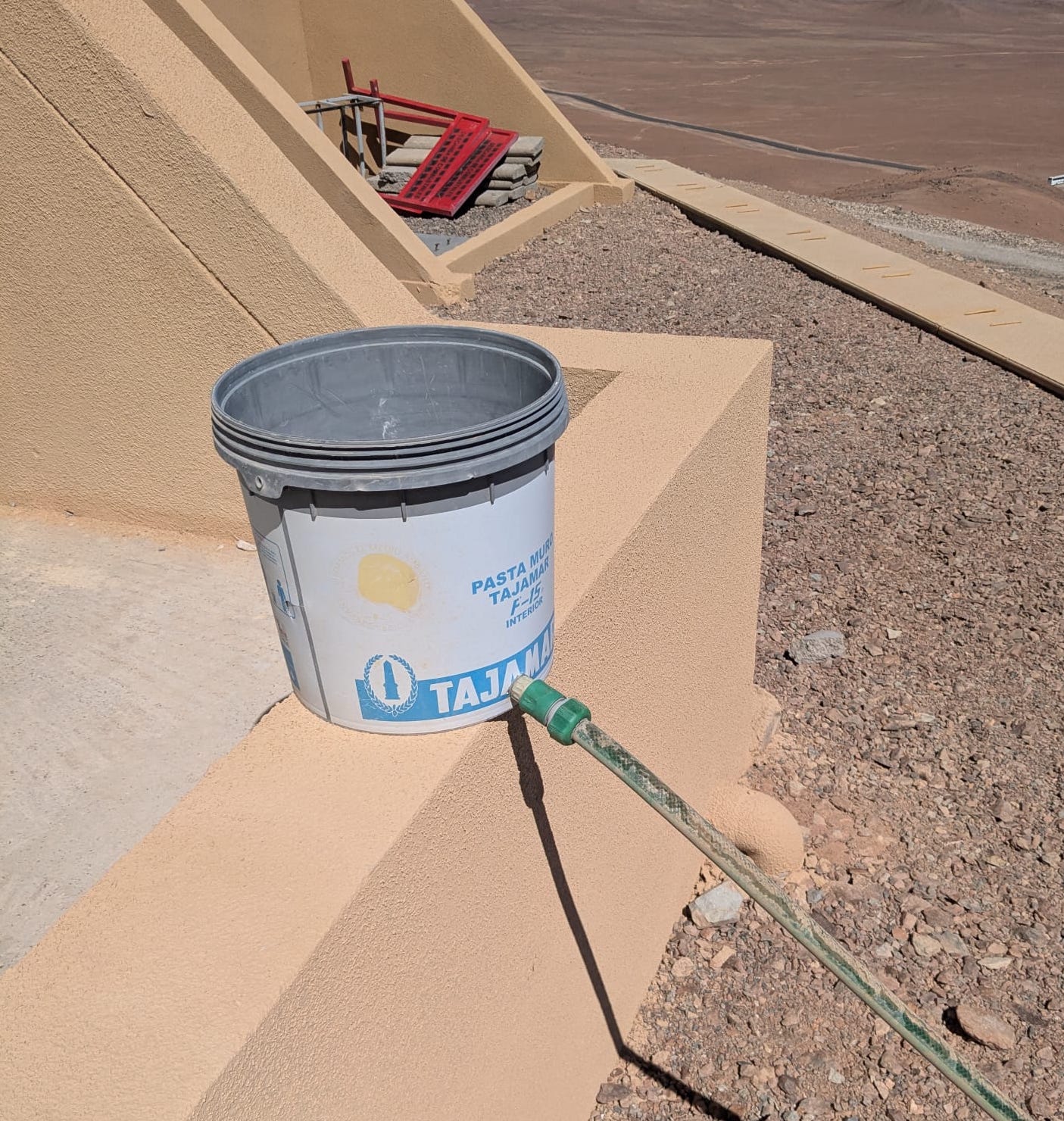
The meshes 2 and 3 consist of 4 pipes arranged in a square and the main pipe that is connected to the hose that transports water. The water from the main pipe is distributed into 4 pipes. Your job is to fill up the big bucket that is located near the water container fully with water and make sure that the water from this bucket travels through the hose to the pipes (Fig 12.). If this mechanism doesn't work, fill the other bucket (the one not connected to the hose) and manually deliver the water to each of the 4 pipes. The pipes have caps that open from the top, so for each of the 4 pipes you need to open its cap, pour about half of the bucket of water and close the cap.
After you're finished, put the bucket away to its place.
There are external taps with water outside of the main building. For watering mesh 2 use the tap located in the corner of the main building in front of the IRIS telescope. It is straightforward in use, i.e. you only need to turn on the tap for the water to flow. Remember to turn it off well, i.e. no leakage.
For watering mesh 3 use the tap next to the water container. To open the water flow you have to open the pump box, and turn on both valves: the one before the pressure meter, and the one behind. The order doesn't matter. The valve is open when its handle is aligned with the pipe, and is closed when the handle is perpendicular to the pipe. Make sure that the hose is inserted to the bucket before you open the valve to ensure no water is lost.
Deep cleaning
Once every few months a list of spaces should be cleaned:
Lounge
- vacuum the spaces behind the couches and chairs
- clean/vacuum skirting boards (listwy przypodłogowe)
- mop the floor
- undust the shelves in the cupboard and chest of drawers
- undust the sound system, TV, and other electronics
Control room
- vacuum and mop the floor
- clean/vacuum skirting boards (listwy przypodłogowe)
- undust and wet-swipe the desks, also behind the monitors
- undust the drawer units and shelves
Kitchen
- vacuum and mop the floor
- clean/vacuum skirting boards (listwy przypodłogowe)
- wet-clean the counter, including behind the coffee maker and other utilities
- deep clean the oven, microwave, kitchen hood (okap)
- deep-clean the fridge
- clean the fronts of the cupboards and drawers
- clean the trash bin
- clean the inside of the drawers
Bodega
- washing machine
- remove the container for detergent/softener and clean it
- run a cycle with the powder for cleaning washing machines
- clean the filter
Solar panels
Clean solar panels with a pressure washer (Kärcher), use only water. Clean them at dawn (ideally during the morning flats) because cleaning them later (when the Sun is higher in the sky) can cause damage to the solars due to too strong light from the Sun, and the hot solars treated with cold water could break.
Driving the OCM car
We have a new car, Toyota RAV4. All the other information about driving a car in Chile you will find in section OCM car.
Leaving OCM for a few hours
- Close water taps/valves.
- Close and check doors, windows.
- Check and turn off energy consumers: heaters, kitchen, dishwasher, lights.
- Let the others know where you're going - on WhatsApp's oca-operations.
- Remember that the guards at the ABC allow people out and back in between 7 a.m. to 7 p.m. Make sure you'll be back on time. Also, the guards take a lunch break between 1:30-2:30 p.m. so they might not be at the gate. Especially on Sundays, arrive at OCM at 5 p.m. the latest, because the guards from the construction company next to OCM block the road with concrete blocks when they go home, which is earlier on Sundays.
Going to Antofagasta
-
Put into the car trunk the refrigerator box with frozen cartridges from the freezer and isolating bags, when you are going shopping. If you need an invoice (factura) to be reimbursed by CAMK for supplies that are not covered by your per diem, remember to take with you and show a document that authorizes you as the OCM observer to make purchases for CAMK (autorisado). You'll be asked for CAMK's name, address in Chile, and RUT:
NOMBRE O RAZÓN SOCIAL: CENTRO ASTRONÓMICO NICOLÁS COPÉRNICO DE LA ACADEMIA POLACA DE CIENCIAS
DIRECCIÓN PRINCIPAL (CASA MATRIZ): LORELEY 1736 DP 1105 LA REINA RUT: 59271020-K GIRO: SIN GIRO -
Refuel the car at Paranal so that it has enough fuel to go to Antofagasta or refuel it in Antofagasta.
- Remember that the guards at the ABC allow people out and back in ony between 7 a.m. to 7 p.m. Make sure you'll be back on time. Also, the guards take a lunch break between 1:30-2:30 p.m. so they might not be at the gate.
Visits at Paranal
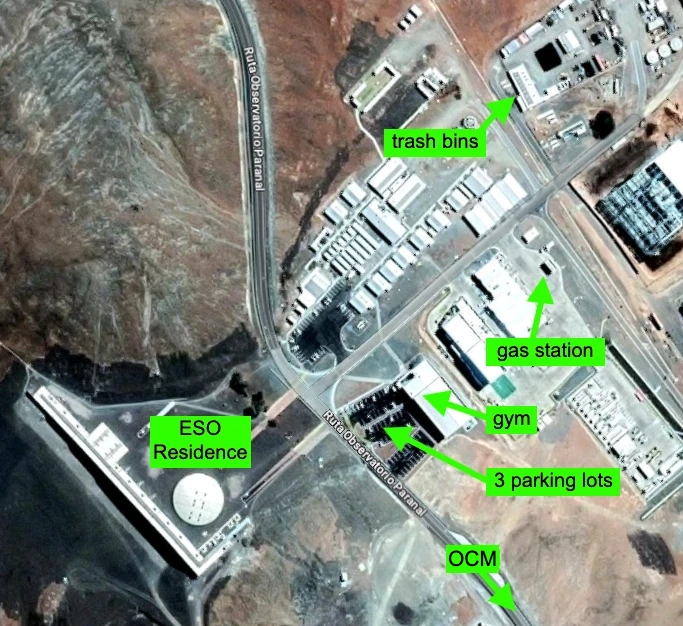
You can visit Paranal once per week. Once you're there, take the opportunity to have lunch, refuel the car, take the trash out, swim in the swimming pool, have sauna, and work out/play squash in the gym. The map of Paranal with all the relevant buildings is shown in Fig. 13.
- Write an email at least 24 h in advance to
parlogs@eso.org, explaining that you are from Polish Observatory Cerro Murphy, and that you would like to pay a visit, kindly ask for authorization (copy-paste from the past emails on gmail). Send this email from ocacontroroom@gmail.com, in the email box you will also find examples of already sent emails. - You can refuel the car. Check how below.
- You can use the swimming pool, sauna, and if you have a visitor ID card you can also use training gear and gym. If you anticipate swimming, remember to take your swimming suit and towel! The bathroom for you to change is in the sauna room, at the level -4, next to the swimming pool.
- Throw out the trash. Only small, general communal trash is allowed; no bulky items or alcohol bottles/cans. Drinking is strictly prohibited at ESO, so throw any alcohol bottles/cans out to public trash bins in Antofagasta city or airport, or Taltal.
- Remember that the guards at the ABC allow people out and back in only between 7 a.m. to 7 p.m. (sunrise to sunset). Make sure you'll be back on time. Also, the guards take a lunch break between 1:30-2:30 p.m. so they might not be at the gate.
Refueling a car at Paranal
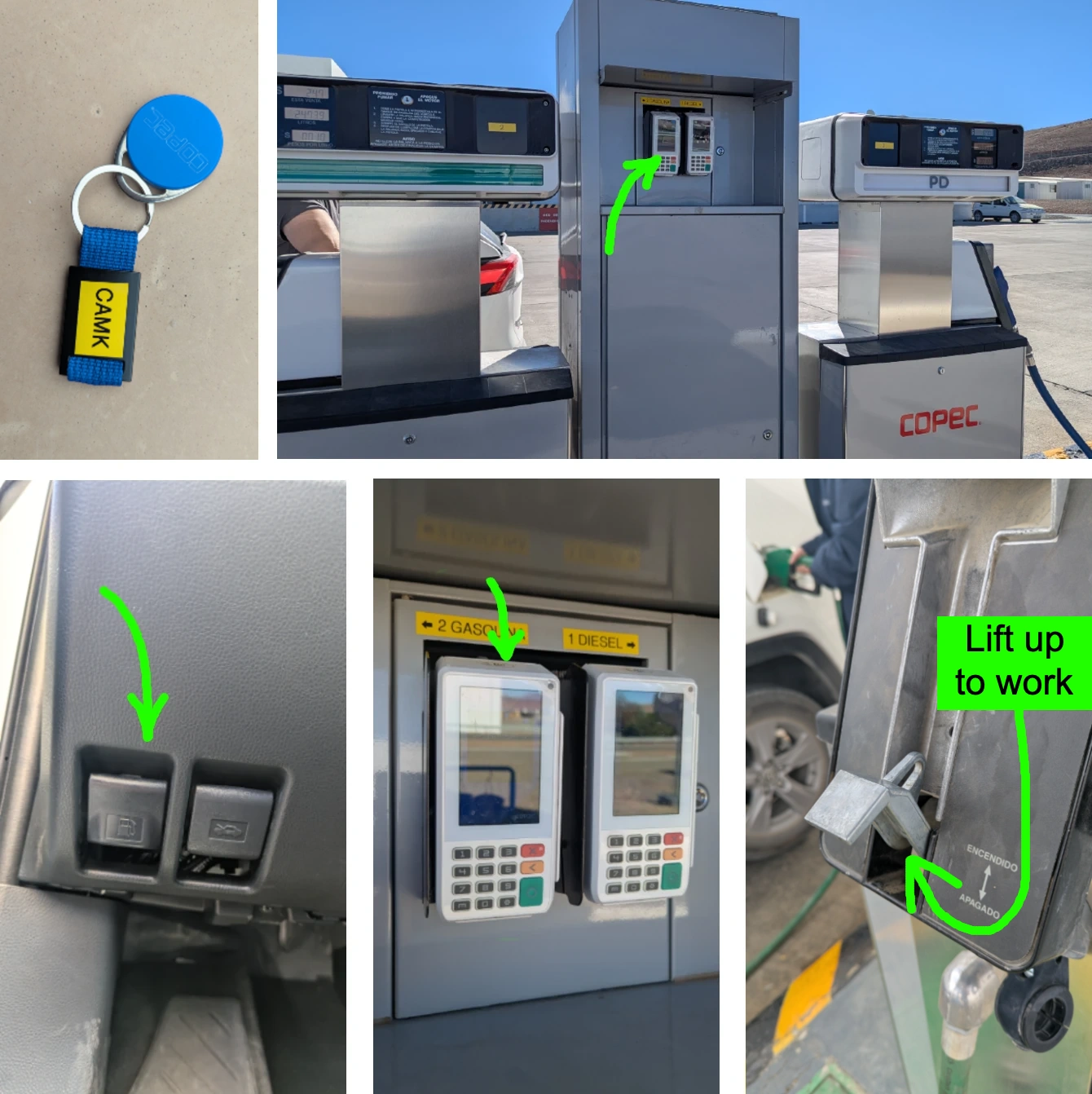
If you want to refuel the car, go to the reception desk in the Paranal Residence and ask for a blue token to refuel a car with "CAMK" name on it. The token is configured to charge CAMK, so no more explanation is needed.
Go to the Paranal gas station (see where it is located in Fig. 13.), and follow the steps:
- Open Toyota's fuel door and take off the fuel cap. The button to open the fuel door is on the left side of the driver, just above their left knee.
- Approach the distributor. From the back side it has two terminals at the center: 1) diesel, 2) gasoline. Toyota RAV4 uses gasoline, so we focus in the distributor 2 (Fig. 14.).
- Take out you blue token and hover it above terminal 2 (GASOLINA) to activate it.
- You will be prompted by terminal 2. Push keys in this order: 1-1-2-ENTER (green confirmation button).
- Approach the gasoline pistol on the side, remove it from the hook, move the hook up to the position ENCENDIDO (turned on).
- Put the pistol into the fuel filler neck in Toyota (fancy name for the hole). Pull the trigger of the pistol, block it in this position, and refuel the car fully. If it makes a high-pitched noise, don't worry, it works fine.
- After successful refueling hang the pistol back on the hook which will go down to the position APAGADO (turned off).
- Go back to the Paranal Residence and give the blue token back.
Visits at the VLT
If - in addition to the visit at Paranal - you would like to schedule the visit at the VLT platform and see the telescopes, you can do it! The VLT tours happen weekly, every Saturday at 10 a.m. and 2 p.m. but these are for formally registered visitors, who registered here. You can either follow the formal path via the link above or the informal path via the steps below:
- Write an email at least 3 days in advance to "administracion@astronomyadventures.cl" and "hernanjulio@astronomyadventures.cl", explaining that you are from Observatory Cerro Murphy, and that you would like to participate in the VLT tour on Saturday or Sunday (excursions are at 9:30 or 13:30), kindly ask for such a possibility.
- Wait for the confirmation. Don't arrive at Paranal without the confirmation.
Visits at the ELT construction site
Yes, you can go and see the ELT construction site! In order to do that, contact Susy Solis
(Susy.Solis@eso.org) or Ivana Friendli (ifriendli@eso.org)3 and they will coordinate
with you a convenient date and hour. You will arrive with our Toyota to the ABC,
from where you'll go to the ELT by our car or on the ESO bus.
Remember to put on wind-proof clothes because it is windy up there! Any other protective clothes (hard hat, sunglasses, gloves, shoes with protective metal on the front) will be provided by ESO.
Visits at the Armazones Base Camp (ABC)
Even though the ABC is so close to OCM, we're not authorized to go there as we wish. As in the case of Paranal and ELT, you have to write an email and ask permission to go there. Write to Susy Solis (Susy.Solis@eso.org) or Ivana Friendli (ifriendli@eso.org).
In case of emergency (lack of internet, power outage, injury) and after exhausting all other options (troubleshooting, WhatsApp and Slack, paper manuals on site, etc.) you can obviously go to ABC unannounced to seek help.
1-or-2-day absence
In case of 1-or-2-day absence (visit at Paranal, Taltal etc.), before leaving make sure you:
- close all the windows (bathrooms, bedrooms, kitchen...),
- turn off the heaters,
- turn off the lights,
- turn off the induction hob and oven,
- close and lock the door to the main building,
- turn off the water valve next to the water container.
Remember that the guards at the ABC allow people out and back in only between 7 a.m. to 7 p.m. Also, the guards take a lunch break between 1:30-2:30 p.m. so they might not be at the gate.
Finishing your observing run
Before leaving OCM (P16)
- Clean your bedroom, remove the bed sheets and put them in the washing machine.
- Clean your bathroom, especially the toilet. Take out the trash with the used toilet paper and put a new trash bag for the next observer.
- Clean the kitchen, throw away bad food, put dirty dishes in the dishwasher.
- If you leave some good but opened food for the next observer, write on the food the date when you opened it and put it on the lowest (common) shelf.
- If you damaged or destroyed something, please be forthcoming about it, and let us know on the weekly meeting and put the info to the OCM Calendar, tab comments.
- Pass OCA-phone to the next observer.
Preparing the observatory for longer absence
- Follow the steps of the procedure "Before leaving OCM (P16)".
- Follow the steps of the shutdown procedure.
- Follow the steps of the procedure "Preparing OCM for longer absence (P17)" below.
Preparing OCM for longer absence (P17)
- Water all the plants, even if they were watered 2-3 days earlier.
- Remove the food from the fridge that you know will go bad during the period of absence, and trash it. Keep the food in the freezer and keep the fridge going.
- Take out the trash (bathroom, kitchen); you will throw them away at the airport or in the city (or in Paranal if you intend going there first).
- Turn off the water valve next to the water tank, and turn off the water pump (the key is in the key box).
- Close all the windows.
- Turn off all the heaters.
- Check the level of the water and record it in the OCM Calendar, tab comments.
- In the control room: lift the heavy window shutter but keep the semi-transparent one down.
- Set up the small camera ("pchełka"), connect it so that it keeps running after you leave (consult oca-operations how to set it up).
- In all the computers in the control room: close all the programs (except the one for the small camera from the point above), turn off the screens (the ones on the wall too), but keep the computers running.
- Unplug the black radio for contacting with Paranal and yellow walkie-talkies (if not unplugged). If yellow walkie-talkies run on batteries - remove the batteries.
- Take the OCA-phone with you + a charger if needed (USB-C).
- Lock the main door behind you. Take the key with you. Consult oca-operations who to give the key to (Miguel or take the key with you).
Restarting the observatory after longer absence
- Follow the steps of the procedure "Restarting OCM after longer absence (P18)"
- Follow the steps of the startup procedure.
Restarting OCM after longer absence (P18)
- Turn on the water valve next to the water tank, and the water pump.
- Water all the plans (or what's left of them).
- Plug in the black radio for contacting with Paranal and yellow walkie talkies (given that they don't run on batteries for now, if they do - put the batteries back).
- If the battery room was closed for some time (weeks), out gassings may have gathered. Leave the door open for several minutes before entering.
- Turn on all screens in the control room.
- Go around OCM and check if everything is as expected. Check for any damage, leackage, check the condition of the solar panels.
- Check the water level and record it (write it down on a piece of paper or in the OCM Calendar, tab comments).
- Check the batteries level.
- Check the level of the liquid in the water heating system, and refill if needed (Procedure P15).
-
The name comes from Miguel Murphy, who is a professor at Universidad Catolica del Norte (UCN) in Antofagasta, and has devoted a lot of time to the development of the observatory and he still helps us with the generator, drinkable water, etc. The manual mentions him several more times. ↩
-
Also known as the Paranal Contractors Camp. ↩
-
There is a note in the OCM control room pointing to Lapeyre Pascal (email: plapeyre@eso.org, WhatsApp: +569 7899 7844) as the person who can also arrange the ELT trips. Should we use it? Has someone successfully used it before? If yes, contact pkarczmarek to update this part of the manual. ↩